Proposals, engagements and invoices, without renting your client list from a platform.
ClientOS follows a piece of consulting work from first conversation to paid invoice, on your own device. It is a one-time purchase at launch, so there is no monthly bill and no platform holding your clients.
iPhone and iPad today. Mac coming soon. Free during the beta.

Four problems every freelance consultant knows, and what ClientOS does.
Proposals go out and then nothing happens. You mean to chase them, but delivery work always wins and the lead quietly dies.
Each lead sits on a board: Lead, Scoping, Proposal, Engaged or Closed. A proposal that stops moving is visible, and overdue alerts on the dashboard prompt the follow-up.
You are not sure who owes you what. An invoice went out in March, a part payment came in, and the rest is hazy.
The payment ledger records every payment against each engagement and shows paid, partial or unpaid. Send branded invoice and statement PDFs straight from it.
Revenue arrives in lumps. A great month is followed by a quiet one, and with no forecast it is hard to know when to prospect.
MTD Revenue, MTD Invoiced and a Revenue Trend chart show your trajectory, and the lead funnel shows what is coming. The budgeting insight adds a tax set-aside estimate so a lump is not all spendable.
Your client list is trapped inside a platform that can raise its price or lock you out, and exporting it is a chore.
The list lives on your device, with no cloud account to lose. Import from CSV, Excel or Contacts, export to CSV or PDF whenever you like, and pay once at launch rather than monthly.
Not someone else's vocabulary.
Pick Freelance Consultant at setup and every label changes. You track engagements, not deals.
| In the app | What you see |
|---|---|
| The core unit of your work | Engagements |
| How revenue is modelled | Project Fee |
| Adding work | New Engagement |
| Month-to-date earnings | Revenue MTD |
| The people and companies you serve | Clients |
| Reference for your own systems | Client / Account Number |
| Share of leads that win | Conversion |
Built around how a freelance consultant works.
A pipeline for proposals
Lead, Scoping, Proposal, Engaged and Closed, on a board or table. Rename and reorder the stages to match your own sales process.
Engagements with project fees
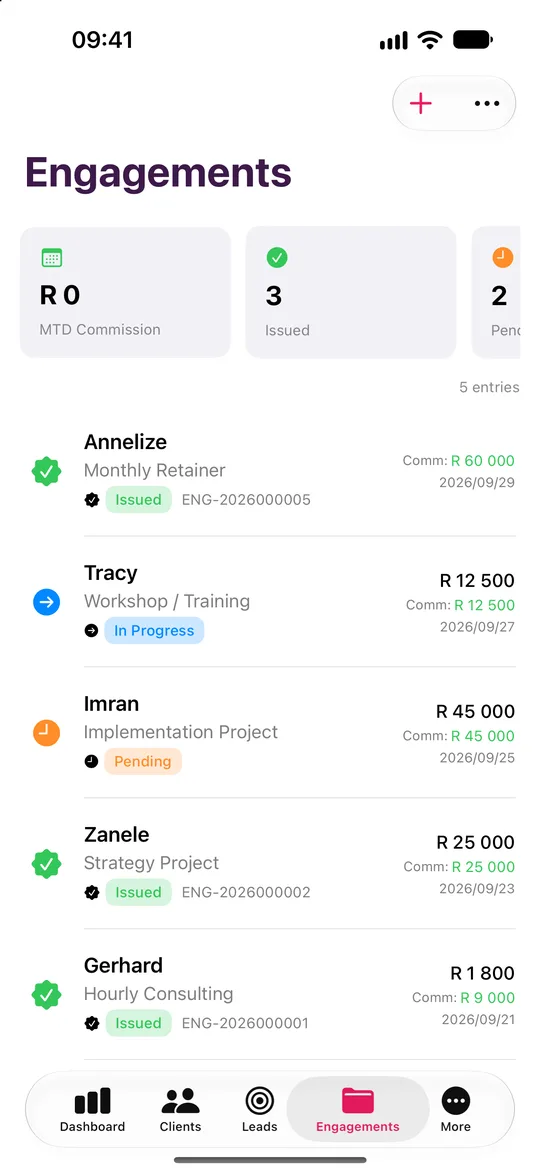
A won lead becomes an Engagement with its own status and fee. The service catalogue covers discovery and scoping, monthly retainer, fixed-fee project, workshop and ad-hoc hourly work.
Know who owes you
The payment ledger tracks each payment against each engagement, with paid, partial and unpaid balances in one place.
Five reports for consultants
Monthly Summary, Lead Conversion, Product Performance, Revenue Analysis and Client Portfolio, exported to PDF, print or CSV.
Tax set-aside, on device
The budgeting insight shows profit, spending hot-spots and a suggested tax set-aside, with CSV export for your accountant.
Yours to keep
No cloud account, no analytics and no subscription. A one-time purchase at launch, with the beta free to try.
Five steps from install to your first report.
Pick Freelance Consultant at setup so the app speaks Engagements, Project Fees and Revenue.
Add a client by hand, or import your book from CSV, Excel or Contacts.
Create an Engagement for that client and set its project fee from your service catalogue.
Move the lead through Scoping, Proposal and Engaged as the work progresses.
Send a branded invoice PDF from the payment ledger, then run Monthly Summary or Revenue Analysis.
Pipeline, reports and lessons, tuned to you.
The dashboard leads with MTD Revenue, with invoiced and conversion beside it.
Your pipeline
- Lead
- Scoping
- Proposal
- Engaged
- Closed
Rename and reorder the stages to match how you work.
Your reports
- Monthly Summary
- Lead Conversion
- Product Performance
- Revenue Analysis
- Client Portfolio
Export to PDF, print or CSV.
Your lessons
- Lead Generation
- Lead Farming
- Discovery Questions
- Objection Handling
- Referral Systems
- Client Retention
- Pricing Conversations
- Difficult Clients
- Getting More from ClientOS
On-device. Discovery, pricing and referrals for consultants.
Your engagements and your clients stay yours.
Encrypted on your device
AES-256-GCM, with the key derived from your password through PBKDF2 at 600,000 iterations.
No server, no account
ClientOS makes no network calls. There is no ClientOS database holding your clients.
Face ID and a recovery key
Unlock with a glance. A printable recovery key means a forgotten password never loses your book.
Your backups, your iCloud
Encrypted backup files go to your own iCloud Drive, never to us.
Freelance Consultant questions
Yes. Set up your Business Profile once, with logo, colours and bank details, then generate branded invoice and statement PDFs. The payment ledger tracks paid, partial and unpaid.
Try it as a freelance consultant.
Leave your name and email and we will send a free TestFlight invitation. Sample data is included, so you can see how it works for your profession before you add a single client.
- Five professions
- iPhone and iPad, Mac coming soon
- Works offline