Your book, your commission and your leads, in one private app.
ClientOS keeps your book of business on your own device, encrypted, and shows you month-to-date commission the moment you open it. No spreadsheet, no cloud account, no sales-team software built for someone else.
iPhone and iPad today. Mac coming soon. Free during the beta.

Four problems every financial planner knows, and what ClientOS does.
Your book lives in a spreadsheet that nobody reminds you to open. Renewals, reviews and birthdays only happen when you remember them.
Clients, leads and follow-ups sit in one place. The dashboard carries overdue alerts and a recent-activity feed, so the next call is on screen when you open the app, not buried in a tab.
You have no idea what your commission is this month until the pay run lands. Planning around a number you cannot see is guesswork.
The dashboard leads with MTD Commission and shows year to date beneath it, with MTD Premium and Conversion alongside. Log a piece of business and the tiles move straight away.
Leads go cold. A prospect asks for a proposal, you get busy, and three weeks later they have signed with someone else.
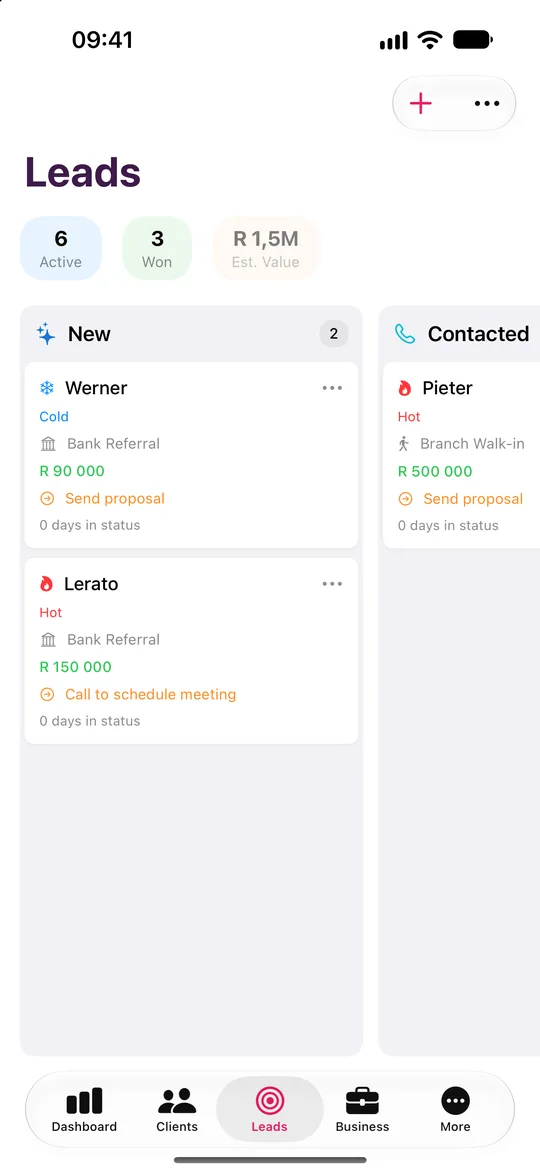
Every lead sits on a board from New to Won, tagged Hot, Warm or Cold. A proposal that stalls at Proposal Sent or Negotiating is visible at a glance, and you can rename the stages to match how you sell.
You do not know which lead source actually pays. Referrals, networking and cold calls all feel busy, but you cannot say which one built your book.
Lead-source charts and a private on-device insight card show where your best business comes from. Keep your own source catalogue and double down on what works.
Not someone else's vocabulary.
Pick Financial Planner at setup and every label changes. You track submitted business, not deals.
| In the app | What you see |
|---|---|
| The core unit you place | Business / Submitted Business |
| Revenue earned | Commission |
| Recurring payment | Premium |
| The people you serve | Clients |
| Main quick action | New Business |
| Share of leads that convert | Conversion |
| Where prospects come from | Lead sources |
Built around how a financial planner works.
Commission first
MTD Commission is the hero tile, with MTD Premium and Conversion beside it and a Commission Trend chart below.
A pipeline for planners
New, Contacted, Meeting Scheduled, Proposal Sent, Negotiating, Won, Lost and Dead, on a kanban board or a table. Rename and reorder to suit.
Submitted Business tracked properly
Log each policy or plan against a client with its status, commission and premium. The product catalogue ships with insurance and investment products and is fully editable.
Five reports for planners
Monthly Summary, Lead Conversion, Product Performance, Commission Analysis and Client Portfolio, each with a date range and export to PDF, print or CSV.
The money side too
A payment ledger, branded invoice and statement PDFs, expenses, other income and an on-device budgeting insight with a tax set-aside estimate.
Private by design
AES-256-GCM encryption, Face ID or Touch ID, a recovery key and zero network calls. Your book never sits on our server because we do not have one.
Five steps from install to your first report.
Pick Financial Planner at onboarding so the app speaks commission, premiums and business.
Add a client by hand, or import your book from CSV, Excel or Contacts.
Open the client, add a piece of Submitted Business, choose the product and record the commission and premium.
Check the dashboard and watch MTD Commission, MTD Premium and Conversion update.
Run Commission Analysis or Client Portfolio, set a date range and export to PDF, print or CSV.
Pipeline, reports and lessons, tuned to you.
The dashboard leads with MTD Commission, with year to date underneath.
Your pipeline
- New
- Contacted
- Meeting Scheduled
- Proposal Sent
- Negotiating
- Won
- Lost
- Dead
Rename and reorder the stages to match how you work.
Your reports
- Monthly Summary
- Lead Conversion
- Product Performance
- Commission Analysis
- Client Portfolio
Export to PDF, print or CSV.
Your lessons
- Lead Generation
- Lead Farming
- Discovery Questions
- Objection Handling
- Referral Systems
- Client Retention
- Pricing Conversations
- Difficult Clients
- Getting More from ClientOS
On-device. Lead generation, referrals and retention for planners.
Your submitted business and your clients stay yours.
Encrypted on your device
AES-256-GCM, with the key derived from your password through PBKDF2 at 600,000 iterations.
No server, no account
ClientOS makes no network calls. There is no ClientOS database holding your clients.
Face ID and a recovery key
Unlock with a glance. A printable recovery key means a forgotten password never loses your book.
Your backups, your iCloud
Encrypted backup files go to your own iCloud Drive, never to us.
Financial Planner questions
Yes. MTD Commission is the first tile on your dashboard, with year to date beneath it. Run the Commission Analysis report before a pay run to check the detail.
Try it as a financial planner.
Leave your name and email and we will send a free TestFlight invitation. Sample data is included, so you can see how it works for your profession before you add a single client.
- Five professions
- iPhone and iPad, Mac coming soon
- Works offline